DESIGNFLOW OS
Run your design studio in one connected system.
From enquiry to delivery - projects, client portals, specifications, FF&E, procurement, fees, tasks and time tracking — all linked in one organised workspace.
Designed for interior design and architecture studios — from solo studios to growing teams
Built by an architect, from live studio workflows.
Enter data once. Reuse it everywhere.
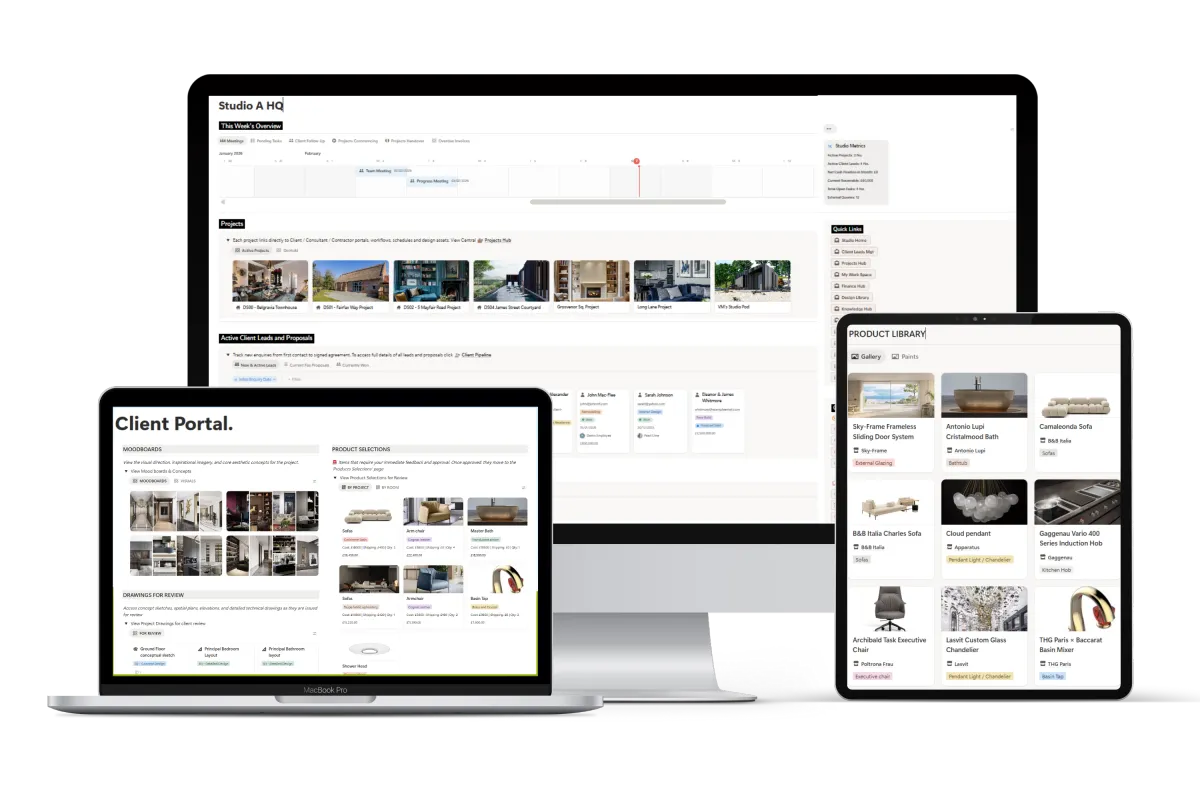
See DesignFlow OS in action
A short tour of the system that will save you 10+ hours a week.

Prefer to explore it yourself?
We’ll email you the link instantly.
Read-only (no editing)
Works in your browser
Includes key hubs, portals, and workflows
Most Studio don't actually have a system.
They have spreadsheets for FF&E, folders for drawings, and WhatsApp for site questions. Information gets duplicated, decisions get lost, and teams spend more time managing projects than designing them.
As studios grow, the chaos grows with them.
Information spread across tools
Projects managed in fragments
Specs, procurement, and fees handled separately
Decisions dependent on individuals
What DesignFlow OS lets you do
Everything is structured. Everything is linked. Everything lives where it should.
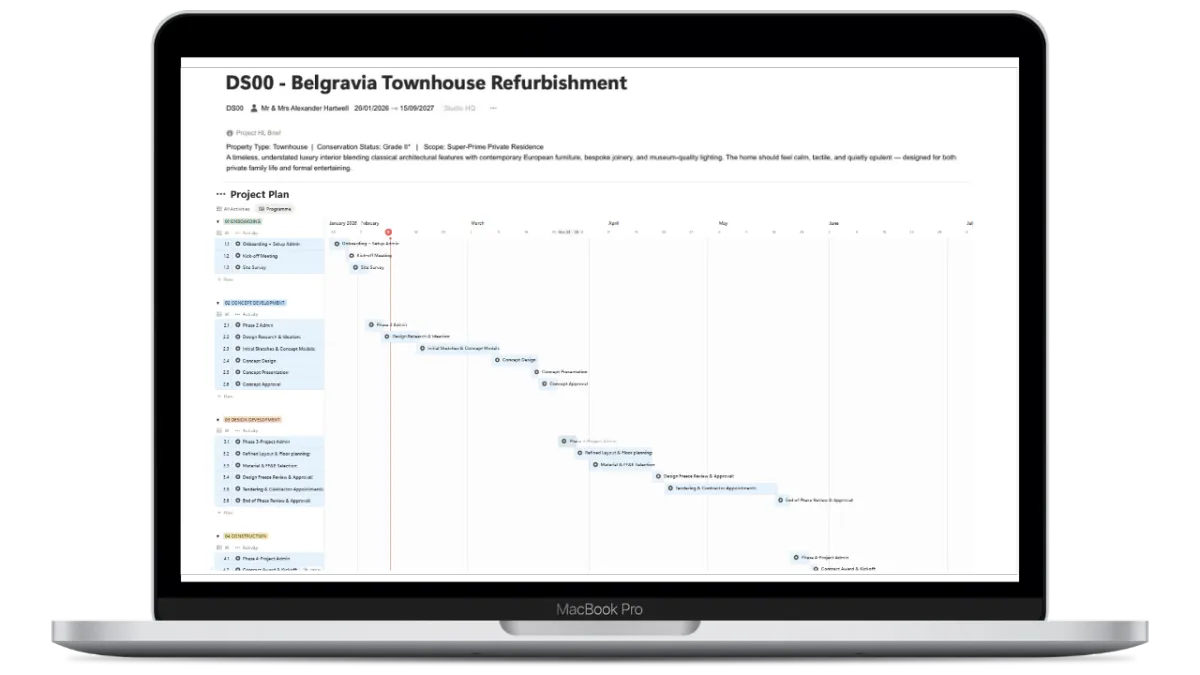
Run projects end-to-end
Phase-based workflows from onboarding to handover. Every decision, document, and conversation stays with the project.
Phase-based workflows
Design assets & CGIs
Client feedback logs
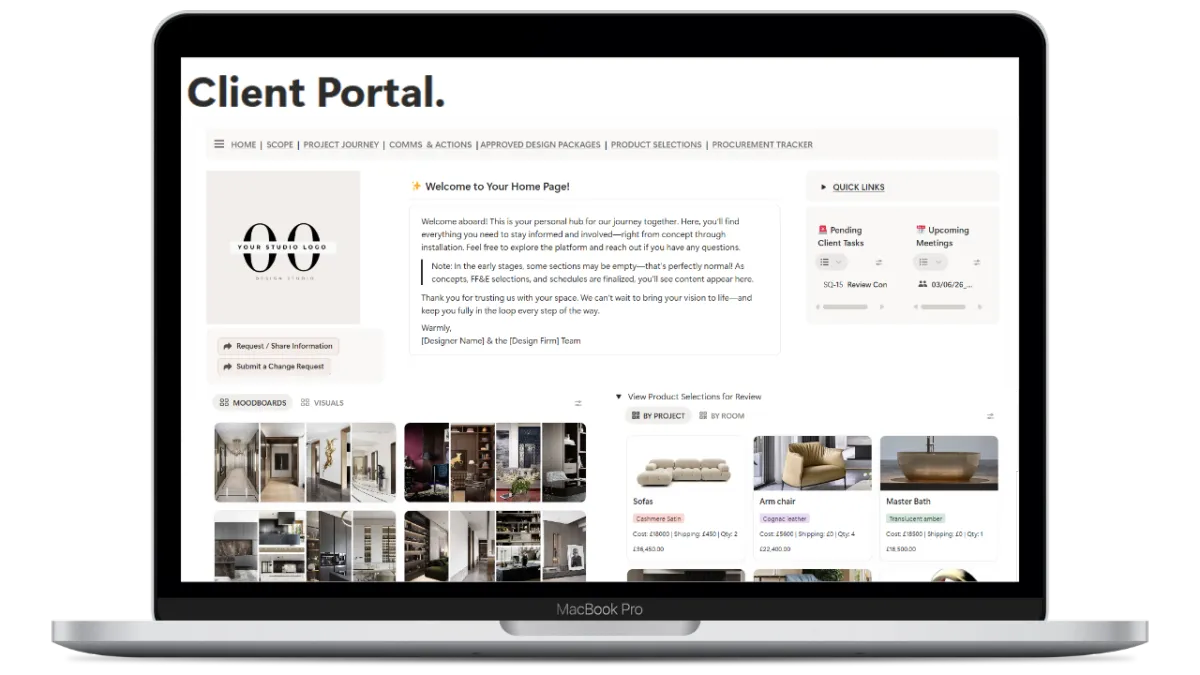
Professional Portals
Dedicated portals for clients, contractors, and consultants. Clients see what they need; you stay in control.
Approvals & Updates
Contractor Schedules
Consultant Coordination

Centralise you FF&E
Store your entire product catalogue once and reuse it forever. Automatically feed schedules and contractor packs.
Vendor details & Trade discounts
Automated Shopping Lists
Lead time tracking
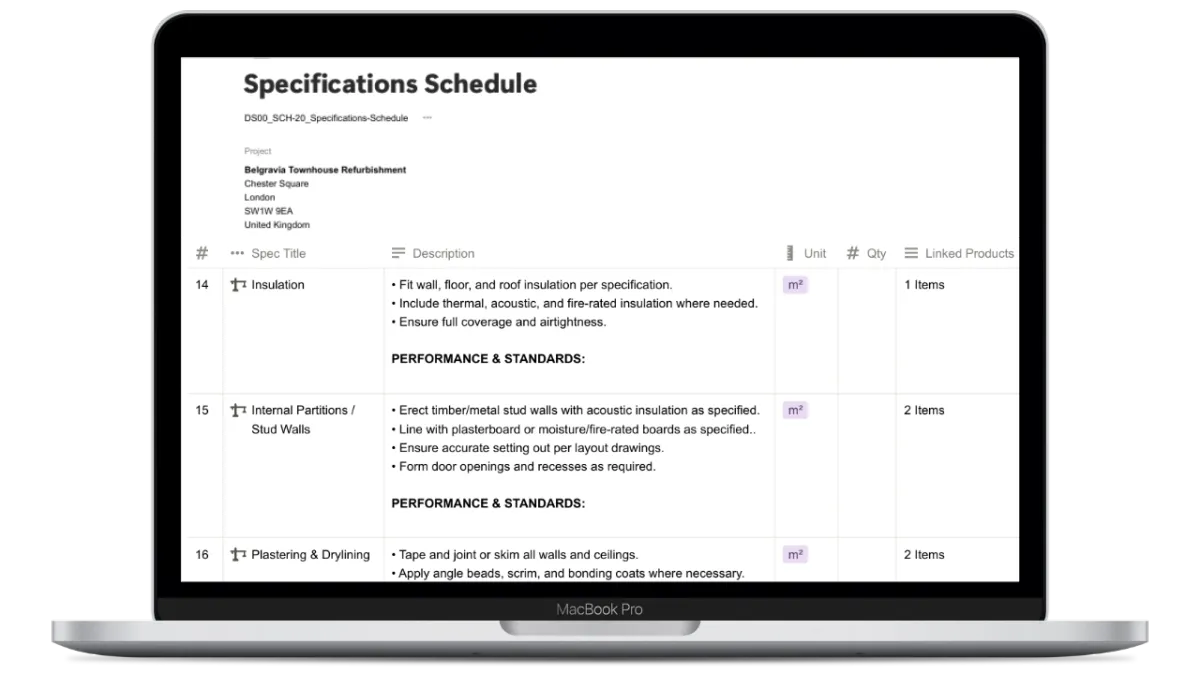
Works Specs & BOQ
Standardised specification system for painting, flooring, joinery, and more.
Clear scope of works
BOQ-style pricing schedules
Fewer site errors
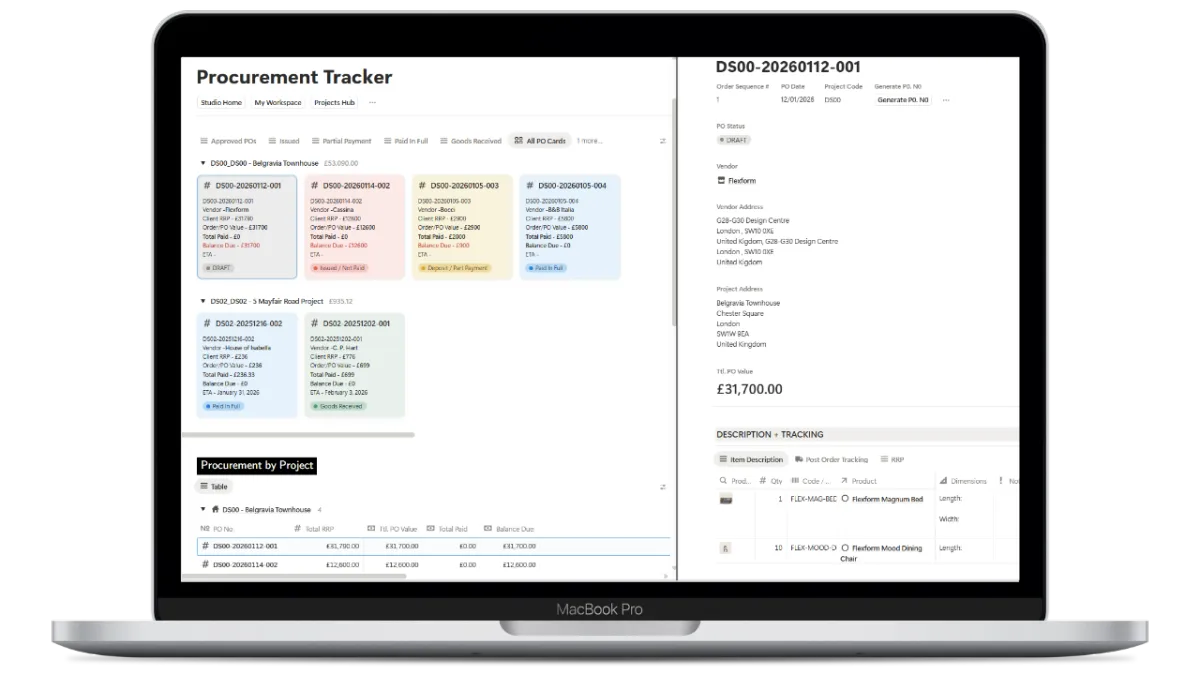
Stress-free Procurement
Manage purchase orders, supplier coordination, and delivery tracking in one calm interface.
Budget vs Actual visibility
Payment records
Supplier coordination
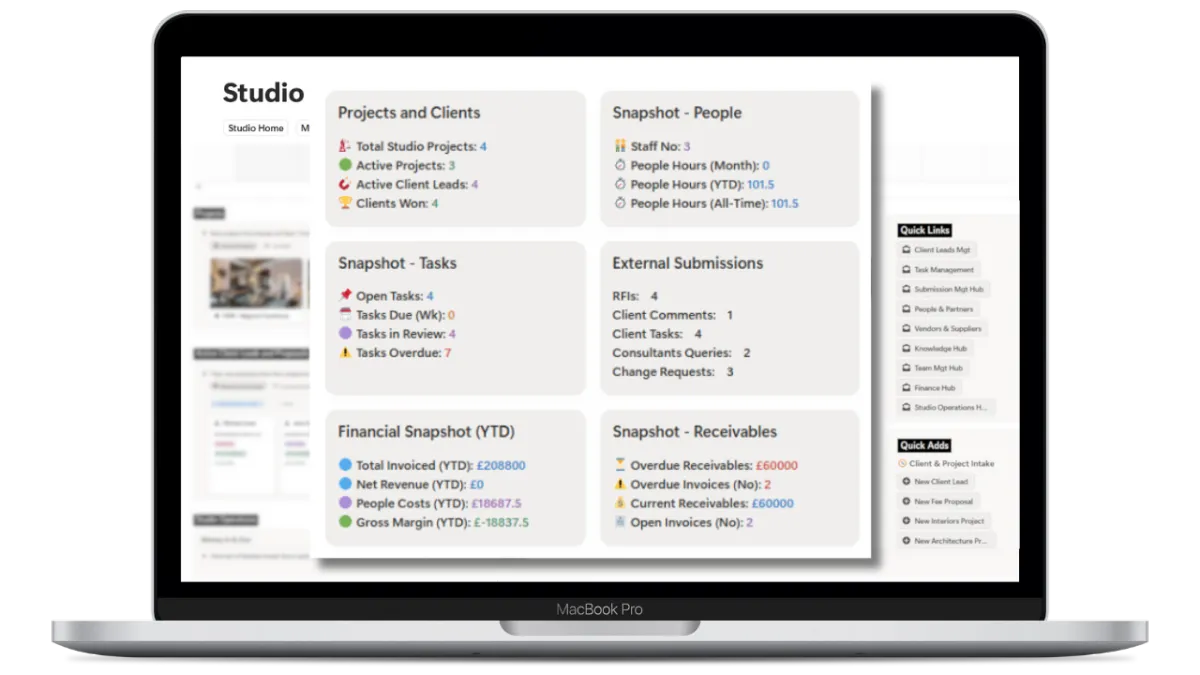
See the state of business
Beyond projects, manage leads, consultations, fee proposals, and team performance.
CRM & Lead tracking
Time tracking & Costs
SOPs & Checklists
What changes after you use it
BEFORE
Scattered tools
Repeated admin
Missed information
Unclear responsibilities
Reactive project management
AFTER
One connected system
Clear workflows
Confident clients
Cleaner site coordination
Better use of time
Your studio starts operating like a much larger, more established practice.
Get instant access
Design-Flow OS is delivered as a duplicate-to-your-Notion workspace. Use immediately, customise forever.
✓ One-time purchase
✓ Works with free Notion accounts
✓ Lifetime access
✓ Created by a designer, for designers
✓ Ready to use
✓ Includes step-by-step video setup instructions
£299 One-time payment. Invest once. Systemise forever.
Everything connects:
Every project
Every product
Every decision
Every task
Every person
Works with Notion
Delivered as a structured workspace on Notion, using clear views and plain language. No technical configuration required.
Straightforward Setup
Duplicate and Go - Access is instant, with short onboarding videos that guide you through the system step by step, at your own pace.
Studios of all sizes
Whether you’re a solo practitioner, a boutique studio, or a growing multi-disciplinary. Most are up and running in a day.
FAQs
Can I customise it to suit my studio and brand?
Absolutely.
Design-Flow OS is fully editable. You can rename phases, adjust workflows, tailor terminology, update templates, and style client-facing portals to align with your brand and working methods.
We recommend reviewing and adapting the system to suit your studio’s processes before using it on live projects.
Who is DesignFlow OS for?
Design-Flow OS is designed for:
- Interior design studios
- Architecture practices
- Solo practitioners and small-to-mid-sized teams
It is particularly suited to studios that want clearer structure, better client communication, and a more connected way to manage projects — without juggling multiple tools.
How do I receive Design-Flow OS after purchase?
DesignFlow OS is a digital product. After checkout, you’ll receive a PDF containing a private link to duplicate the full Notion workspace into your own account.
Once duplicated, the system is yours to use and customise.
What if I’ve never used Notion before?
Design-Flow OS is built specifically for design studios, not productivity enthusiasts. You don’t need prior Notion experience.
The system comes pre-structured with guided workflows, templates, and step-by-step video tutorials that walk you through how to use it day to day. Most studios are up and running within a day.
Do I need a paid Notion plan?
You can use Design-Flow OS on Notion’s free plan..
If you work with a large team or want advanced permissions and file storage, Notion’s paid plans may be helpful — but they are optional and managed directly through Notion.
How many projects can I manage with DesignFlow OS?
There’s no limit for now with Notion.
Design-Flow OS is designed to scale — whether you’re managing one residential project or multiple projects across different teams. Each project lives in its own structured workspace while remaining connected to your studio’s shared data.
Can I export schedules, specs, or data to Excel or PDF?
Yes.
Most tables and views can be exported directly from Notion to Excel, CSV, or PDF — making it easy to issue schedules, pricing documents, or reports to clients, contractors, or consultants who aren’t using Notion. However PDFs don't export well. There are apps such as https://www.printnotion.com/index.html which provide PDF options.
Can I share client portals with clients, contractors, and consultants?
Yes.
Design-Flow OS includes dedicated portals designed for clients, contractors, and consultants. Each portal shows only the information relevant to that audience, helping you collaborate clearly while keeping internal data private.
Does DesignFlow OS replace my contracts or professional advice?
No.
Design-Flow OS is a project management and workflow system, not a substitute for professional judgement, contracts, or statutory obligations.
All templates, specifications, and guidance are provided as organisational tools and examples only. Studio owners are responsible for reviewing, customising, and approving all content to ensure it aligns with their services, contracts, local regulations, and professional responsibilities.
Do you provide support or custom setup?
Yes.
Design-Flow OS includes guided video tutorials to help you set up and adapt the system.
Paid support, onboarding sessions, and customisation services are available for studios that want help tailoring Design-Flow OS to their specific workflows, services, or team structure.
What is your refund policy?
Because DesignFlow OS is a digital product delivered instantly, all sales are final.
We’re unable to offer refunds or exchanges once access has been provided.
We strongly recommend reviewing the walkthrough video and FAQs before purchasing.
Important note:
DesignFlow OS is a workflow and project-management system intended to support studio operations. While it has been developed by a qualified architect and interior designer, it does not constitute legal, contractual, or professional advice.
All users are expected to review, adapt, and validate templates, specifications, and processes to suit their own practice, contracts, jurisdiction, and professional obligations.

Client Portals
Clients, consultants and contractor personalised portals

CRM & Leads
Manage client enquiries and setup.

FF&E Library
Products, costs and procurement tracking

Specifications
Professional NBS-Style Logic

Fees & Time
Timesheets, invoicing, purchase orders, and expenses

SOPs
Documented standard procedure

Scheduling
Project management and scheduling
© DesignFlowOS. All rights reserved.
DesignFlow OS is operated by Lapunne Limited, so payments may appear under that name on your statement.